Ms. Mark Jui
Profile Coming Soon

Profile Coming Soon
Ubuntu with Windows 10 dual Boot
Lets do Some Real work
STEP 1:Download Ubuntu
Download Ubuntu from http://www.ubuntu.com/download/desktop.
Once you have downloaded the ISO of Ubuntu 16.04 or 14.04, go to this page and download the latest version of Universal USB Installer.
STEP 2:Download Universal USB Installer http://www.pendrivelinux.com/universal-usb-installer-easy-as-1-2-3/
STEP 3: CREATING THE BOOTABLE USB
Plugin the USB drive in the computer and run Universal USB Installer. You need to do the following things now:
Select Ubuntu under step 1
Browse to the location of downloaded Ubuntu ISO in Step 2 section
In Step 3, select the USB drive and also check the option to format it make sure its FAT32
Step 4: Backup your Windows 10 operating system (optional but highly recommended)
Step 5: Create two partition by shrinking your drive for linux ( 1 for ex2 and 2nd for Swap )
Step 6:We will be using those partition as we boot with usb and see ubuntu install screen
Step 7:Now Restart windows and press F12 ,F2 to go to Boot up screen or Bios setting
Step 8:Stay with UEFI setting as thats the safest way to install another OS and Linux are UEFI safe
Step 9 :If you are using some version of Unix which is not UEFi compatible switch off the SAFE boot menu
Now let live USB run
Step 10:if you receive this error When I try to boot from the USB I get the error msg:
Could not find kernel CONFILE
boot:
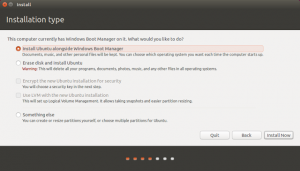
Step 11: Now you see the Ubuntu screeen Ubuntu will recognize the windows system and give you option on any non Winodws OS disk In UEFI Mode
Choose the “Install Ubuntu alongside Windows Boot Manager” option.
Something else Option is not good for Dual Boot it will hide one of OS .

Step 12:You can go to advance and see any other Partition Pick those two partition createat step 5

Let it finish make sure you have selected
Choose the “Install Ubuntu alongside Windows Boot Manager” option. otherwise you may not be able to boot into dual mode and
Linux will be only OS recognized by computer .


If you want to do manual partitions like i do
Please visit
http://askubuntu.com/questions/343268/how-to-use-manual-partitioning-during-installation
Another topic for those who doesnot want to Install ubuntu and use Windows 10 feature
The Windows 10 feature Windows Subsystem for Linux:
This can give you ability to run Linux bash command but thats not what you want.
For those who want to stick with Windows Subsystem for Linux
You do this by going “System Settings > Advanced Windows Update options” and selecting your Insider Preview update setting to the far right. This sets your Windows 10 update to the the Fast Ring.
After this check for updates, apply all of them, and restart your PC. This gives you its beta operating system so don’t do this on your production machine. Microsoft makes many updates to its Fast Ring releases and adding WSL, Ubuntu, and Bash are only part of them.
Then, you must turn on Developer Mode via Settings > Update & security >
For developers. Next, search for “Windows Features” and choose “Turn Windows features on or off” and
enable Windows Subsystem for Linux
Lets discuss color capabilities in .net
For most people Color is RGB or ARGB
In.net
Color is a struct. This type provides a standard way to specify and mutate colors in the C# language. By adding a reference to the System.Drawing assembly, you can access this type and avoid writing your own color routines.
Colors can be represented as ARGB values, which store the alpha transparency, as well as the red, green and blue values. These values are stored as bytes which gives them a range of 0 to 255 inclusive.
So in order to make new color ( thats what this code does) suppose you have two colors color a and color b
Step 1
Please take the color a and convert into RGB component via Private Class colorcomponent
Step 2
do the same step with color b
now for individual R take the average or fraction s if you are creating more than 2 color
Step 3
suppose R component is 100 for color a
suppose R component is 150 for color b
Step 4
then the middle color should have R value as 125
you may create 4 intermediate color in that case your will have R as 110 120 130 140
Step 5 do same for G a nd B also and combine them to color back see colorcomponent class


please download zip code file
<p> How to use this class “colorcomponent” </p>
Dim colora As Color
colora = Color.Red
Dim colorb As Color
colorb = Color.Blue
Dim coloracomponent As New colorcomponent()
Dim colorbcomponent As New colorcomponent()
coloracomponent.setcolor(colora)
colorbcomponent.setcolor(colorb)
Dim numberofcolor = 4
Dim outColor(numberofcolor + 1) As Color
ReDim outColor(numberofcolorinbetween + 1)
outColor = coloracomponent.getcolorarray(coloracomponent, colorbcomponent, numberofcolorinbetween + 1)
vb.net code for desktop application
Public Class Form1
Private Sub Form1_Load(sender As Object, e As EventArgs) Handles MyBase.Load
Dim colora As Color
colora = ColorTranslator.FromHtml(“#ff66ff”)
Dim colorb As Color
colorb = Color.Green
ListBox1.Items.Add(ColorTranslator.ToHtml(colorb))
ListBox1.Items.Add(ColorTranslator.ToHtml(colora))
End Sub
Private Class colorcomponent
Dim r As Integer
Dim g As Integer
Dim b As Integer
Dim a As Integer
Public Sub setcolor(C As Color)
Me.r = C.R
Me.g = C.G
Me.b = C.B
End Sub
Public Function getcolor(colorcomponent1 As colorcomponent) As Color
getcolor = Color.FromArgb(colorcomponent1.r Mod 256, colorcomponent1.g Mod 256, colorcomponent1.b Mod 256)
End Function
Public Function getcolorwithalpha(colorcomponent1 As colorcomponent, alpha As Byte) As Color
getcolorwithalpha = Color.FromArgb(alpha, CByte(colorcomponent1.r Mod 256), CByte(colorcomponent1.g Mod 256), CByte(colorcomponent1.b Mod 256))
End Function
Public Function getcolorarray(colorcomponent1 As colorcomponent, colorcomponent2 As colorcomponent, numberofcolorsneededinbetween As Double) As Color()
Dim outcolorcomponent As New colorcomponent()
Dim outColor(numberofcolorsneededinbetween) As Color
outColor(0) = getcolor(colorcomponent1)
If numberofcolorsneededinbetween > 0 Then
For i As Double = 1 To numberofcolorsneededinbetween – 1
If (colorcomponent1.r – colorcomponent2.r <> 0) Then
outcolorcomponent.r = (colorcomponent1.r) + (((-colorcomponent1.r + colorcomponent2.r) * i / (numberofcolorsneededinbetween)))
Else
outcolorcomponent.r = (colorcomponent1.r)
End If
If (colorcomponent1.g – colorcomponent2.g <> 0) Then
outcolorcomponent.g = (colorcomponent1.g) + (((-colorcomponent1.g + colorcomponent2.g) * i / (numberofcolorsneededinbetween)))
Else
outcolorcomponent.g = (colorcomponent1.g)
End If
If (colorcomponent1.b – colorcomponent2.b <> 0) Then
outcolorcomponent.b = (colorcomponent1.b) + (((-colorcomponent1.b + colorcomponent2.b) * i / (numberofcolorsneededinbetween)))
Else
outcolorcomponent.b = (colorcomponent1.b)
End If
outColor(i) = getcolor(outcolorcomponent)
Next
End If
outColor(numberofcolorsneededinbetween) = getcolor(colorcomponent2)
Return outColor
End Function
End Class
Private Sub Button1_Click(sender As Object, e As EventArgs) Handles Button1.Click
Dim colora As Color
colora = ColorTranslator.FromHtml(“#ff66ff”)
Dim colorb As Color
colorb = Color.Green
Dim coloracomponent As New colorcomponent()
Dim colorbcomponent As New colorcomponent()
coloracomponent.setcolor(colora)
colorbcomponent.setcolor(colorb)
Dim numberofcolors = 4
Dim outColor(numberofcolors + 1) As Color
outColor = coloracomponent.getcolorarray(coloracomponent, colorbcomponent, numberofcolors + 1)
ListBox1.Items.Clear()
Dim i = 1
For Each genfcolor As Color In outColor
Dim t As New TextBox()
Dim j = 100
‘ t.Location = New Point(t.Location.X + i, t.Location.Y + i)
t.ForeColor = genfcolor
t.Text = ColorTranslator.ToHtml(genfcolor)
‘Panel1.Controls.Add(t)
ListBox1.Items.Add(ColorTranslator.ToHtml(genfcolor))
‘ t.Location = New Point(ListBox1.Location.X + 100, ListBox1.Location.Y + i)
Me.Controls.Add(t)
t.Location = New Point(8 * 50, 4 + i * 30)
Me.Show()
i += 2
Next
End Sub
End Class
c# code
using Microsoft.VisualBasic;
using System;
using System.Collections;
using System.Collections.Generic;
using System.Data;
using System.Diagnostics;
public class Form1
{
private void Form1_Load(object sender, EventArgs e)
{
Color colora = default(Color);
colora = ColorTranslator.FromHtml(“#ff66ff”);
Color colorb = default(Color);
colorb = Color.Green;
ListBox1.Items.Add(ColorTranslator.ToHtml(colorb));
ListBox1.Items.Add(ColorTranslator.ToHtml(colora));}
private class colorcomponent
{
int r;
int g;
int b;int a;
public void setcolor(Color C)
{
this.r = C.R;
this.g = C.G;
this.b = C.B;
}public Color getcolor(colorcomponent colorcomponent1)
{
return Color.FromArgb(colorcomponent1.r % 256, colorcomponent1.g % 256, colorcomponent1.b % 256);}
public Color getcolorwithalpha(colorcomponent colorcomponent1, byte alpha)
{
return Color.FromArgb(alpha, Convert.ToByte(colorcomponent1.r % 256), Convert.ToByte(colorcomponent1.g % 256), Convert.ToByte(colorcomponent1.b % 256));}
public Color[] getcolorarray(colorcomponent colorcomponent1, colorcomponent colorcomponent2, double numberofcolorsneededinbetween)
{colorcomponent outcolorcomponent = new colorcomponent();
Color[] outColor = new Color[numberofcolorsneededinbetween + 1];
outColor(0) = getcolor(colorcomponent1);
if (numberofcolorsneededinbetween > 0) {
for (double i = 1; i <= numberofcolorsneededinbetween – 1; i++) {
if ((colorcomponent1.r – colorcomponent2.r != 0)) {
outcolorcomponent.r = (colorcomponent1.r) + (((-colorcomponent1.r + colorcomponent2.r) * i / (numberofcolorsneededinbetween)));
} else {
outcolorcomponent.r = (colorcomponent1.r);
}
if ((colorcomponent1.g – colorcomponent2.g != 0)) {
outcolorcomponent.g = (colorcomponent1.g) + (((-colorcomponent1.g + colorcomponent2.g) * i / (numberofcolorsneededinbetween)));
} else {
outcolorcomponent.g = (colorcomponent1.g);
}
if ((colorcomponent1.b – colorcomponent2.b != 0)) {
outcolorcomponent.b = (colorcomponent1.b) + (((-colorcomponent1.b + colorcomponent2.b) * i / (numberofcolorsneededinbetween)));
} else {
outcolorcomponent.b = (colorcomponent1.b);
}
outColor(i) = getcolor(outcolorcomponent);
}
}
outColor(numberofcolorsneededinbetween) = getcolor(colorcomponent2);return outColor;
}
}private void Button1_Click(object sender, EventArgs e)
{
Color colora = default(Color);
colora = ColorTranslator.FromHtml(“#ff66ff”);
Color colorb = default(Color);
colorb = Color.Green;
colorcomponent coloracomponent = new colorcomponent();
colorcomponent colorbcomponent = new colorcomponent();
coloracomponent.setcolor(colora);
colorbcomponent.setcolor(colorb);
dynamic numberofcolors = 4;
Color[] outColor = new Color[numberofcolors + 2];
outColor = coloracomponent.getcolorarray(coloracomponent, colorbcomponent, numberofcolors + 1);
ListBox1.Items.Clear();
dynamic i = 1;
foreach (Color genfcolor in outColor) {
TextBox t = new TextBox();dynamic j = 100;
// t.Location = New Point(t.Location.X + i, t.Location.Y + i)
t.ForeColor = genfcolor;
t.Text = ColorTranslator.ToHtml(genfcolor);
//Panel1.Controls.Add(t)
ListBox1.Items.Add(ColorTranslator.ToHtml(genfcolor));
// t.Location = New Point(ListBox1.Location.X + 100, ListBox1.Location.Y + i)
this.Controls.Add(t);
t.Location = new Point(8 * 50, 4 + i * 30);
this.Show();
i += 2;
}}
public Form1()
{
Load += Form1_Load;
}}


Please check this page and tell me how you like it
